I Thought My Dev Container Couldn't Reach My Mac. Not Quite.
On this page

Summary
I tried to make my dev containers airtight. At some point, I had to stop and focus on features instead. But this setup is good enough for me: without escaping Docker's VM, anything reachable from the container has a capped blast radius.
What decided it was blast radius:
| Credential | Blast radius | Decision |
|---|---|---|
| Subscription tokens (Claude, Codex) | Cost capped by the plan | Acceptable inside the container |
| Agent GitHub token and GPG key | Revocable, gated by branch rulesets | Inside by design |
Cloud credentials (~/.azure) | My credit card limit 😬 | Never mounted, never shared |
| My own signing key | Physical YubiKey | Unreachable |
Read further for details of refining my setup and how I addressed each exfiltration point that could allow an LLM running in a container to access my host file system.
My Setup
I run Zed with Docker Desktop on macOS. The agents, Claude Code and Codex, run inside a dev container built from my own image, julieio/agent-devcontainer that pre-bakes tools I use frequently, e.g. jq, uv, and a headless browser.
The agent has its own identity @julieio-agent, scoped to the session on my Mac:
- its own GitHub account and personal access token
- its own GPG signing key
- branch rulesets that require my approval before anything merges to
main
My own signing key stays on a physical YubiKey. Nothing in the container can sign as me.
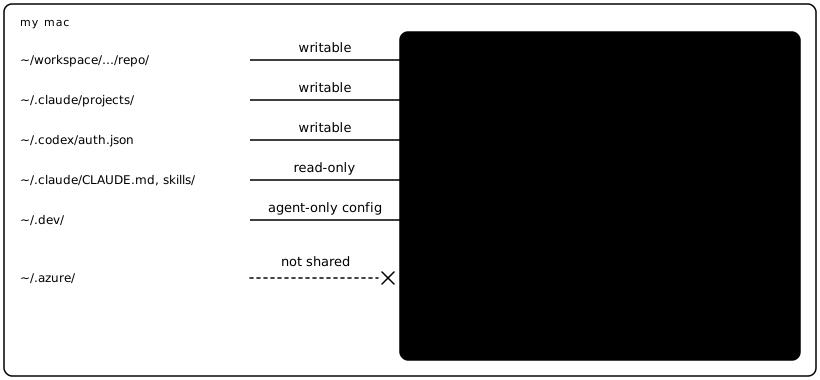
From my Mac, I mount:
- the repository, at the same path as on the host, so Claude's project memory matches
- agent-only config from
~/.dev: a container-onlysettings.json, managed settings, Codex config and the agent's credentials - read-only: my
CLAUDE.md, skills and Codex'sAGENTS.md - writable: Claude's project memory and Codex's
auth.json
Inside the container, ~/.claude is a Docker volume, not my Mac's folder. The mounts above are layered on top.
The container also uses the docker-in-docker feature, so the agent can build and test the project's own containers, and start a throwaway PostgreSQL for tests. That turned out to matter most.
What I Found
A devcontainer.json describes what you want. It doesn't prove what you got – especially when adding features on top. So I checked from inside the container. Then, after making backups, I asked the agent to do exactly what I wanted to prevent: add and edit files in ~/.dev.
It could 😦. The files changed on my Mac.
What I found:
docker-in-dockermakes the container privileged. Full capabilities, no seccomp profile, passwordlesssudo, and the agent's user is in thedockergroup.- Read-only doesn't stay read-only. With
sudo, the agent can remount a read-only bind as writable. Withoutsudo, it can do the same from a privileged container it starts itself.
Removing sudo does not fix this. Access to Docker is root access.
So it isn't "Docker is insecure." What weakened the boundary was docker-in-docker, a convenience feature that grants privileges.
I tested both in Zed and VS Code and although I found VS Code's implementation to be more robust, when using the docker-in-docker feature, the mounts were still writeable and not read-only as specified.
So, how can an agent reach into my Mac?
The VM Route: Needs an Escape
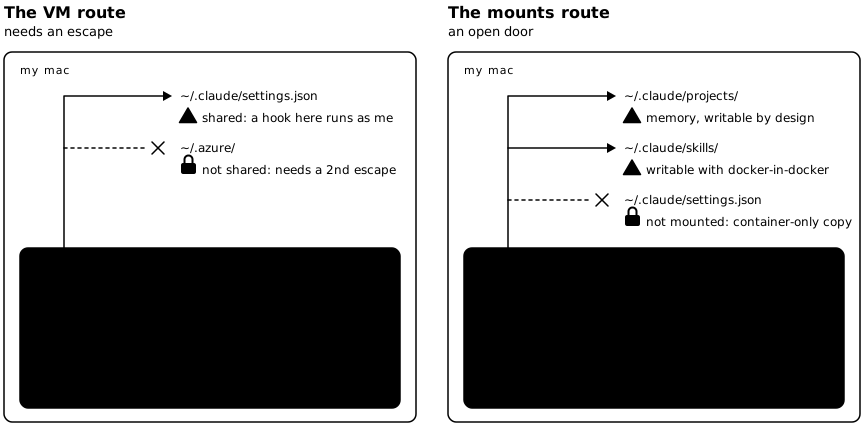
On macOS, Docker containers run inside a Linux VM. A privileged container is close to root in that VM. That step is easy.
From the VM, the agent can reach whatever Docker Desktop shares from my Mac. By default, that includes all of /Users, i.e. my entire home folder.
I narrowed the share list to the folders my dev containers actually mount. Docker now refuses anything else:
❯ docker run --rm -v ~/azure:/x alpine ls /x
docker: Error response from daemon: mounts denied:
The path /Users/jng/.azure is not shared from the host and is not known to Docker.
So my cloud credentials in ~/.azure aren't shared. Reaching them would take a second escape, from the VM into macOS itself. That's a much higher bar.
Shared isn't the same as mounted, though. Docker Desktop still shares all of ~/.claude with the VM, because the files I bind into the container come from inside it. The container only sees those files. A root process in the VM could see the whole folder, including my Mac's real settings.json.
I can't drop the ~/.claude share, because Docker can only mount what it shares. But I can narrow it to just the subfolders I mount.
The Mounts Route: An Open Door
Anything mounted writable is already on my Mac. So after configuring the shares in the Docker app, the next step was closing the doors in my devcontainer.json, knowing that read-only also meant read-write because most of my projects use docker-in-docker.
Agent's own Identity via ~/.dev
My agent has its own identity and I also decided to store its specific configuration files, e.g. settings.json separately from my own – because it is writable.
~/.dev
├── claude-code-managed-settings.json # policy, enforced by Claude Code
├── claude-settings.json              # intentionally writable (e.g. /model)
├── codex.config.toml
├── codex.rules
├── julieio-agent.private.asc
├── julieio-agent.public.asc
└── README.md
Memories and Hooks
The biggest risk for something to run on my host is via configuration, e.g. settings.json or config.toml. Hooks defined there run on my Mac (the host) the next time Claude Code or Codex starts outside the container, without asking. That's why the container now gets its own settings.json from ~/.dev. It's not airtight, but it keeps an unsupervised agent from adding hooks that run on my system.
Memory is different. The agent can write memory that a future Mac session loads. But memory has to persuade my host agent to do something, and my permission settings still gate it. A hook just runs.
Watch for any mounted file that can act on your host: hooks, skill scripts, anything another tool executes later.
Claude Configuration
The first mount is a named volume, e.g. claude-code-config-${devcontainerId}, that starts empty. Then I layer my user's CLAUDE.md, skills and memories, as well as the agent's specific settings file, on top.
The volume lives on the Docker VM's disk, not in my Mac's file system. Whatever Claude Code writes to ~/.claude in the container stays there, except in the files I layer on top. My Mac's own settings.json, where hooks would run as me, isn't mounted at all.
"mounts": [
  /* Claude - writable volume to persists credentials */
  "source=claude-code-config-${devcontainerId},target=/home/vscode/.claude,type=volume",

  /* CLAUDE.md */
  "source=${localEnv:HOME}/.claude/CLAUDE.md,target=/home/vscode/.claude/CLAUDE.md,type=bind,readonly",

  /* Claude's - Settings.json, container specific, not host file */
  "source=${localEnv:HOME}/.dev/claude-settings.json,target=/home/vscode/.claude/settings.json,type=bind,consistency=cached",

  /* Claude - Skills */
  "source=${localEnv:HOME}/.claude/skills,target=/home/vscode/.claude/skills,type=bind,readonly",

  /* Claude - Memories */
  "source=${localEnv:HOME}/.claude/projects,target=/home/vscode/.claude/projects,type=bind",

  /* Claude - Policy the agent can't override or edit */
  "source=${localEnv:HOME}/.dev/claude-code-managed-settings.json,target=/etc/claude-code/managed-settings.json,type=bind,readonly",
]
Persisting credentials via a volume mount should work according to Claude Code documentation, but in my experience, it did not work consistently in my setup.
Codex Configuration
Because my AGENTS.md instructs Codex to use the Claude specific memory folder, I'm just mounting configuration and skills.
"mounts": [

  /* Codex - config, rules */
  "source=${localEnv:HOME}/.codex/AGENTS.md,target=/home/vscode/.codex/AGENTS.md,type=bind,readonly",
  "source=${localEnv:HOME}/.dev/codex.config.toml,target=/home/vscode/.codex/config.toml,type=bind,readonly",
  "source=${localEnv:HOME}/.dev/codex.rules,target=/home/vscode/.codex/rules/default.rules,type=bind,readonly",

  /* Codex - skills */
  "source=${localEnv:HOME}/.agents/skills,target=/home/vscode/.agents/skills,type=bind,readonly",

  /* Codex Auth, needs write for refresh tokens */
  "source=${localEnv:HOME}/.codex/auth.json,target=/home/vscode/.codex/auth.json,type=bind",
]
And yes, I also mount Codex's auth.json, which needs write access to refresh tokens – and this avoids me having to constantly re-authenticate.
What's Left
What I could do further…
- remove
/tmpand/var/foldersfrom file sharing - share only the
~/.claudesubfolders I mount - Enhanced Container Isolation, a paid Docker offering, which stops containers from remounting read-only binds
Why I Still Use Dev Containers
The container boundary is softer than I assumed. But I still managed to achieve these goals:
- the agent's credentials are its own, and revocable
- its reach to repos is limited (configured via GitHub.com controls)
- my approval still gates what merges (also GitHub.com configuration)
- my own key is on a physical YubiKey
Risk is lower when:
- there's no
docker-in-docker - the editor honors
readonly - nothing mounted can execute on the host
Test your own setup instead of trusting the config file. Make backups, then ask your agent to write somewhere it shouldn't be able to. What happens tells you more than any devcontainer.json or settings.json will.
I didn't realize that docker-in-docker turns on privileged mode. I work with containers a lot, so switching it off isn't really an option for me. For now, I'm accepting that risk. I use reputable harnesses, Claude Code and Codex, and I'm counting on them to notice malicious code in a compromised skill before they run it.
Is it airtight? No. But it works well enough, and I'd rather spend my time on what comes next: getting agents to run in ephemeral pods in the cloud. The architecture for that is now public at julie.io/ai-native-sdlc. Stay tuned for more updates.